
My old computer was getting slow and having nursed it along by upgrading the RAM and replacing hard drives with newer SSD’s it was finally time to bite the bullet and build a new box.
I use my computer for web development, audio production and video editing, so I need something that is reasonably powerful without breaking the bank.
I had a decent budget of around $3000, so I invested some time in researching what might be the best parts to buy to give me the most bang for my buck.
Of course, I could have just purchased a complete system but building a digital audio workstation is much more fun!
I decided to go with the Intel i9-12900K processor and I would need to get a mainboard that would support that processor as the socket is LGA 1700.
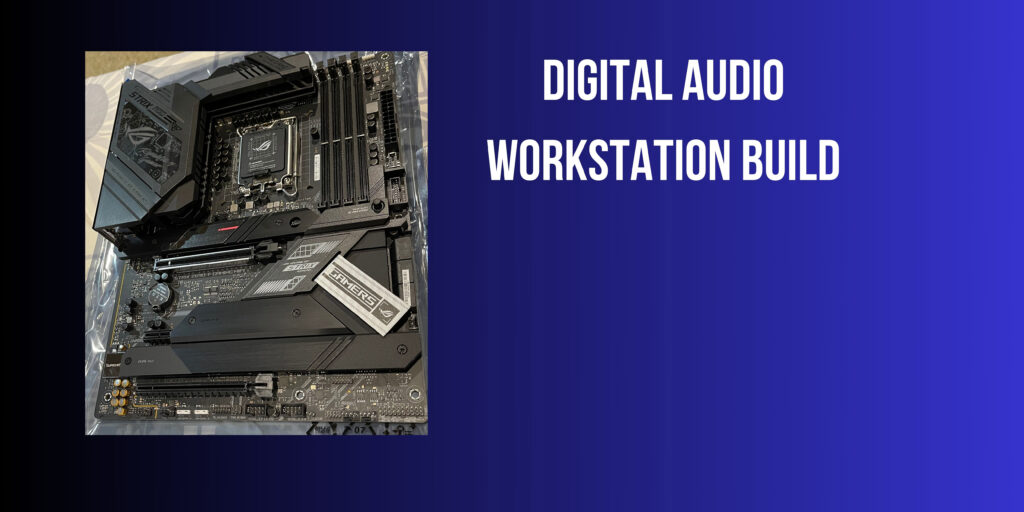
I went with the ASUS ROG Strix Z690-F as I am a fan of ASUS motherboards, and it has great specs.
Since I’ll be working with video and audio I needed a decent amount of RAM so I went with the Kingston Fury Beast 32GB DDR5. At 5200MT/s this RAM is fast and having a single module means that I can max out the RAM in my system at a future date. My girlfriend did surprise me at Christmas and bought an identical 32GB module which brought me up to 64GB in total!
Moving on to the storage, I went with the M.2 NVMe SSD drives from Samsung, specifically the 970 EVO plus. I got two at 1TB each and I also purchased a Samsung 870 EVO 1TB SSD for extra storage space.
I like to run my operating system and programs on a separate drive from the video and audio files. So, one of the NVMe drives is dedicated to those files.
Next comes the video card. Now that piece of hardware could easily break the bank. I did some research and found a recommendation for the MSI GeForce RTX 3060 Ti Ventus 2X. This card looked like it would work well with my motherboard and had enough power to handle my audio and video needs. This video card is hard to find now, so I would go with the MSI GeForce RTX 4060 Ti Ventus 3X if I was building this system today.
To power the system I went with a CORSAIR RMX Series RM850x 80 Plus Gold power supply which may have been overkill but I like to have that extra power on hand. Especially if I decide to upgrade the GPU at some point.
To house the system, I wanted a silent case as I record audio close to where the computer is located. The FRACTAL Design, define 7 Compact turned out to be a great choice for soundproofing even though the fancy led’s on the mainboard cannot be seen! The case opens easily with no tools required.
Cooling for the processor is provided by a Noctua NH-D15S chromax which has an NF-A15 PWM 140mm fan onboard. I did add a second NF-A15 fan to the cooler and a Noctua NF-S12B redux-1200 PWM fan in the case. I hardly ever hear the fans kicking in unless I am doing a lot of video processing. Pretty much never when running audio sessions. They are extremely quiet.
Once the computer was built, I installed my DAW software to test it out.
I use Presonus Studio One for audio production and Reason Studios “Reason” for inspiration.
Here is a list of the parts that I used. If something is not available, I have linked to a suitable alternative.
- CPU (Central Processing Unit) - Intel i9 12900K
- Motherboard - ASUS ROG Strix Z690-F
- RAM (Random Access Memory) - Kingston Fury Beast Black 32GB
- Storage (SSD or NVMe) - Samsung 970 EVO Plus 1TB
- Power Supply Unit (PSU) - Corsair RM850X 80 Plus Gold
- Graphics Card - MSI GeForce RTX 4060 Ti Ventus 3X
- Case - Fractal Design Define 7 Compact
- CPU cooler and case fans - Noctua NH-D15S chromax CPU Cooler
- Noctua NF-A15 Fan
- Noctua NF-S12B 1200 PWM Fan
- Mouse - Red Dragon M686 16000DPI Gaming Mouse